How to Combine Dialpad Call Services with AI Receptionist
If your business uses Dialpad call services, you can take calls via their cloud system, including caller ID and built-in scalability. However, you may not have complete call coverage, especially during busy workdays and after hours. AI Receptionist integration adds advanced AI agent support to cover your bases when your agents can’t get to the phone.
This guide walks you through three solid setups to help you use AI Receptionist with Dialpad to make sure you never miss a call again.
What Does AI Receptionist Do?
AI Receptionist provides businesses with a phone number to their AI answering agent. This agent can take calls, answer questions, set appointments, and more, just as a human agent would. The difference is that an AI agent can answer whenever the business needs to fill coverage gaps in their human agents’ schedule, cover during a vacation, or just answer customers on weekends.
The setup is simple, even if you’re already using a call service like Dialpad. Here’s how you can integrate the two services to get the most out of your new AI agent.
1. Forward All Calls Every Time
When to use: You’re out of office, on vacation, or you just want every Dialpad call automatically handled by AI Receptionist.

Steps (Web App):
- Log in at dialpad.com.
- Click your avatar → Your Settings → Your Devices.
- Click Add New → Add a forwarding number.
- Paste your AI Receptionist tracking number and hit Verify (you may need to answer a test call and press 1).
- Once verified, check the bubble next to the number and set it to Always.
- Save changes.
This forwards every call to AI Receptionist, no questions asked. This is great for the times when your business is on vacation or going through an unplanned closure. It works on weekends too. Any time you want full call coverage with little to no manpower required, these steps will keep your business on-call.
2. Forward Missed or Busy Calls Only
When to use: You or your team usually answer, but you still want AI Receptionist to pick up if you’re busy or miss a call.
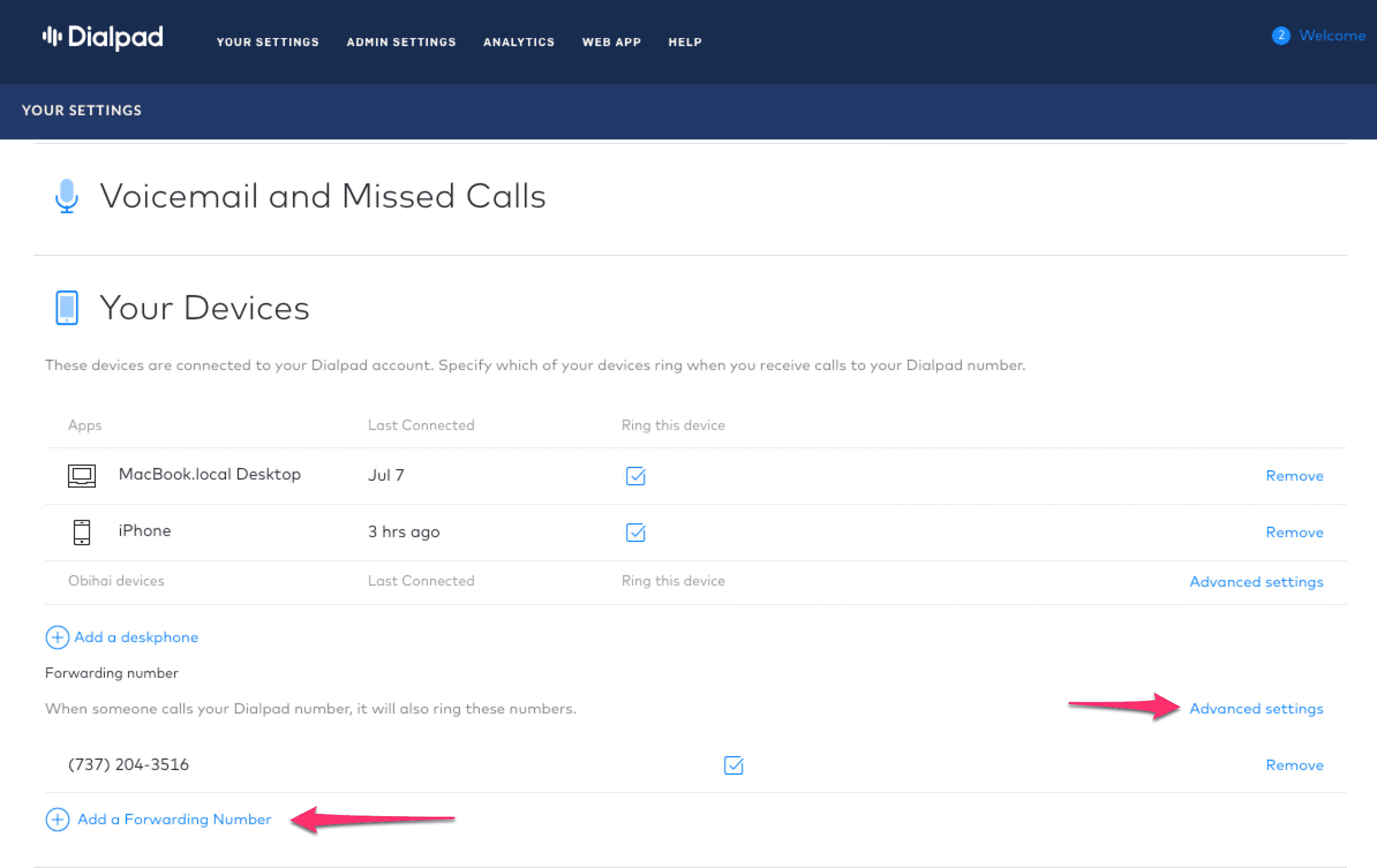
Setup:
- Follow steps 1–4 above (“Add… forward number”).
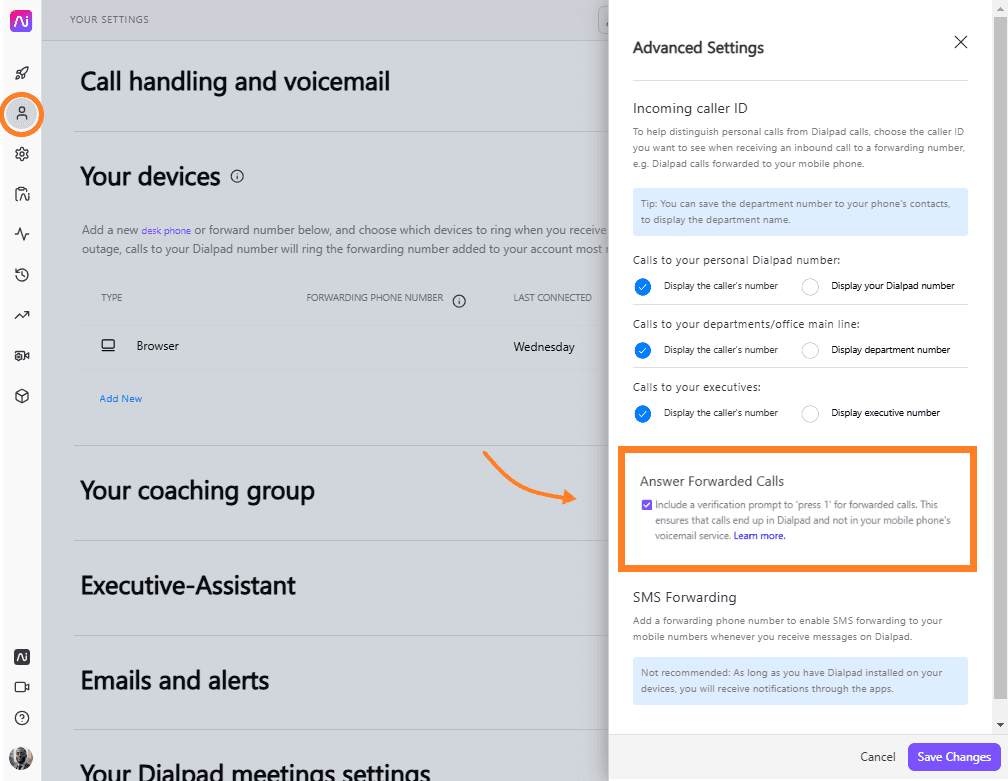
- After verifying, choose forwarding behavior in the Advanced Settings panel:
○ Forward when busy
○ Forward when unanswered (you can set the number of rings)
○ Forward not reachable (great fail-safe) - Save.
Once this is set up, callers get busy signal fallback, missed call fallback, and even offline fallback to AI Receptionist. There’s practically no one they will call your business and be left on the hook, even if every human agent is busy.
3. Forward Only After-Hours / Weekends
When to use: You want team coverage during work hours, but trust AI Receptionist during evenings and weekends to pick up the slack.
Since Dialpad doesn’t support time-based rules per user by default, here’s a simple workaround:
Option A (Manual toggle):
- Use the setup from Step 1 when you’re off.
- Manually disable forwarding when you’re working again.
Option B (For Departments or Contact Centers):
- In Admin Settings → Departments, pick your department.
- Go to Business Hours & Call Routing → Edit Call Routing.
- Set calls to agents during open hours, then choose forward to a forwarding number (insert your AI Receptionist number) for after-hours.
- Save.
This setup routes calls to team members first, then to AI Receptionist only during off hours. This is great for businesses with strong teams of on-call agents who can handle most requests but who still want to make sure no calls slip through the cracks.
Tips & Common Pitfalls
Dialpad and AI Receptionist integration is simple, but some businesses may still have trouble setting it up. Here are two common issues:
- Verification Stall: During “Verify,” Dialpad calls AI Receptionist. Make sure routing is temporarily ready for this test so it completes, or you may have to do it again.
- Press‑1 Forwarding Prompt: Turn it on in Advanced Settings so forwarded calls go through to the agent, not to voicemail. If you pick up early, you may still get prompted to “press 1” due to Dialpad logic.
Dialpad uses the last added forwarding number if the system experiences an outage, but AI Receptionist can serve as a fallback. The system can handle most issues without further input, but you may still need help.
For Additional Assistance:
If the system isn’t working the way it should, or you’re unsure how to complete the setup, call us at 1-800-928-2086, or log into your account at dialmycalls.com to find our help center.
If the issue is on Dialpad’s end, they have live chat and 24/7 phone support at their help center here.
Final Thoughts
This guide arms you with three flexible forwarding methods: full forwarding, conditional fallback, and after-hours coverage. Once your chosen method is set up, AI Receptionist can do its thing without much input. Your AI agent doesn’t need to be babied to keep up with calls. It will handle your call forwarding and messaging services exactly like a human agent, just with 24/7 coverage and precise performance metrics. If you need a new setup or want to change your call coverage, you can change its workflow at the push of a button.
Visit us at dialmycalls.com to start your free trial today.

Dialpad