

Automated Text Message Service

Automated Text Messaging Made Simple

An automated text message service sends scheduled or triggered SMS to your contacts automatically, so reminders, alerts, and updates go out on time without manual sending.

Whether you're sending a one-time announcement or building automated workflows, you can reach thousands of contacts with reliable SMS delivery and real-time reporting.

4.8/5 from 1500+ reviews
across Capterra, G2, and more
Texting Services

Over 40,000+ Organizations Rely On Us To Deliver Millions Automated Text Messages!

  • Goodwill
  • Chrysler
  • YMCA
  • USA Network
  • The University Of New Mexico

What Are Automated Text Messages or Text Message Automation?

Automated text messaging lets businesses send SMS messages without manually texting every contact. You create your message, choose who should receive it, and decide when it should be sent. DialMyCalls automatically delivers your texts on schedule or when a specific event occurs.


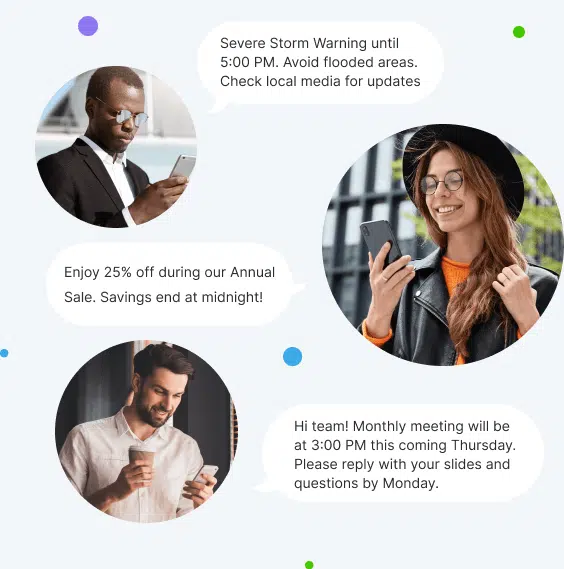
Businesses use automated text messaging every day for appointment reminders, emergency alerts, employee notifications, customer updates, event reminders, payment notices, and marketing campaigns. It's one of the fastest and most reliable ways to keep people informed.


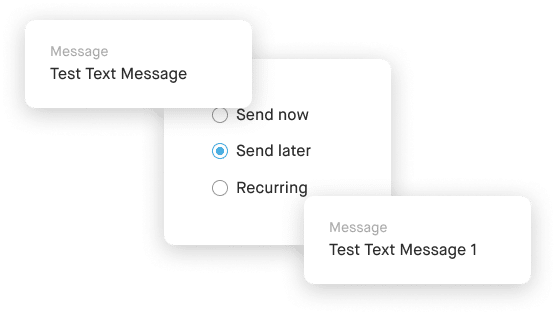
A texting service like this means that the sender doesn’t need to send identical messages to multiple people manually. A single message sent out via an automated text message service can go out to thousands of people. Another part of the process that can be automated is the sending time. If the sender wants a message sent at a specific time in which they aren’t available, they can simply schedule the message in advance.


Responses to these text messages can also be compiled automatically for the sender to review later on. This helps to organize the entire texting process when communicating with multiple people simultaneously.

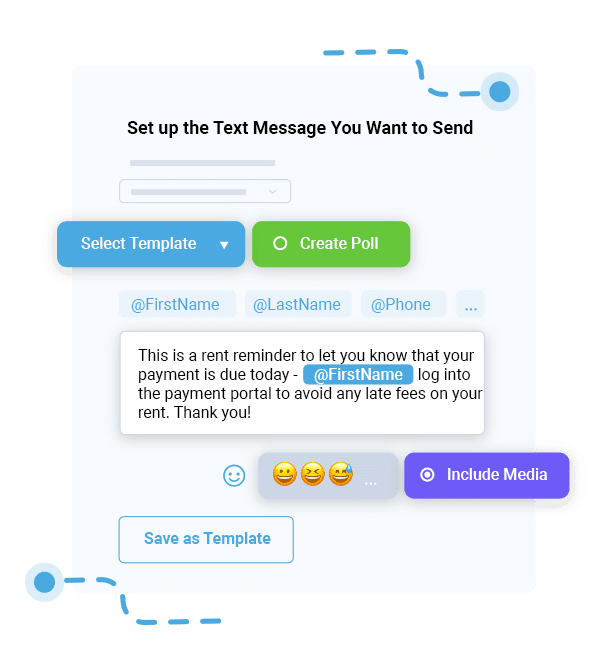
Rent Reminder Text Message

Popular Types of Automated Text Messages to Send

Scheduled Text Messages

Recurring Text Messages

SMS Drip Campaign

Emergency Alerts

Automated Text Message Reminders

E-commerce Messages

Auto-responders

Key Features of Our Automated Texting Software

We make it easy for you to create, schedule and send automated text messages to all your contacts at once. Take a look at all the texting features that DialMyCalls offers:

Which Businesses Can Benefit From Automated Text Messages, and How?

Automated texting by DialMyCalls is used by various organizations including schools, businesses, nonprofits, property management companies, churches, and many more. Let's take a look at just how all of these different organizations can benefit from automated text messages:

Smarter Text Messaging with Automation

Workflow Automation

Workflow automation makes business text messaging faster, smarter, and more reliable. Instead of manually sending every text message, DialMyCalls allows you to automate SMS communication based on customer actions, appointments, registrations, and other important events. Triggered text messages help ensure customers receive timely reminders, confirmations, follow-up messages, and notifications exactly when they need them. Whether you’re communicating with customers, employees, members, parents, or residents, automated workflows eliminate repetitive tasks while keeping your organization connected. By automating recurring communication, your team can spend less time managing messages and more time focusing on the people they serve.

Automated text messaging also helps improve consistency across your organization. Every customer receives the right message at the right time without relying on manual processes or staff availability. Businesses use workflow automation to send appointment reminders, event updates, payment notifications, welcome messages, employee alerts, and customer follow-ups with minimal effort. As your organization grows, automated workflows make it easier to scale communication while reducing errors and missed messages. With flexible event-based texting and customizable automation, DialMyCalls gives businesses an easy way to streamline communication, improve response times, and create a better experience for every recipient.

Lead Nurturing & Sales Follow-Up

Following up with leads quickly is one of the most effective ways to increase customer engagement and improve sales opportunities. DialMyCalls helps businesses automate lead nurturing by sending timely SMS follow-up messages after customer inquiries, consultations, registrations, purchases, or other important interactions. Instead of relying on manual outreach, businesses can automatically stay connected with prospects throughout the customer journey. Text messaging provides a fast, convenient way to continue conversations, answer questions, and encourage customers to take the next step, helping your team build stronger relationships while saving valuable time.

Automated sales follow-up also creates a more consistent customer experience. Businesses can send appointment reminders, promotional offers, event invitations, product updates, and personalized follow-up messages that keep prospects engaged without overwhelming staff. Two-way texting allows customers to reply directly with questions or confirmations, making conversations feel personal while improving response rates. Whether you’re managing a handful of leads or communicating with thousands of potential customers, DialMyCalls helps streamline customer acquisition and lead nurturing through reliable, automated SMS communication that keeps your business connected every step of the way.

SMS Autoresponders

Customers expect fast responses, even when your team isn’t available. SMS autoresponders help your business instantly acknowledge incoming text messages by automatically sending welcome texts, confirmation messages, keyword replies, appointment confirmations, and after-hours responses. Immediate replies reassure customers that their message has been received while providing important information without requiring manual intervention. Whether someone joins your contact list, requests information, registers for an event, or sends a question after business hours, autoresponders help create a professional and responsive customer experience from the very first interaction.

Automatic text message responses also reduce workload by handling common communications for your team. Instead of manually replying to every new inquiry, DialMyCalls automatically delivers the appropriate response based on your settings. Businesses use SMS autoresponders to confirm appointments, acknowledge registrations, welcome new subscribers, provide support information, and keep conversations moving while staff members focus on higher-value tasks. Combined with two-way texting, autoresponders help organizations respond faster, improve customer satisfaction, and maintain reliable communication around the clock without adding additional administrative work.

Personalized Text Messaging

Personalized text messages help businesses create stronger customer relationships by making every conversation feel more relevant and engaging. DialMyCalls allows you to automatically personalize SMS messages using variable date (merge fields) and dynamic content, including first names, appointment details, event information, account updates, locations, and other contact-specific information. Instead of sending the same generic message to every recipient, each customer receives communication tailored to their individual situation. Personalized messaging helps increase engagement, improve response rates, and create a better overall customer experience.

Personalization also makes large-scale communication more effective without creating additional work for your team. Dynamic content automatically inserts the correct information into every outgoing message, allowing businesses to send thousands of customized text messages in just minutes. Whether you’re sending appointment reminders, event notifications, follow-up messages, employee updates, or customer announcements, personalized SMS communication helps every message feel more meaningful. By combining personalization with automation, DialMyCalls helps organizations communicate more efficiently while delivering the individualized experience today’s customers expect.

How is DialMyCalls used?

Ways To Use Our Automated Text Messaging Service

As a marketing tool to announce new product or services.

To simplify communication with employees, students, or team members.

As a prompt to receive feedback from clients, students, or volunteers.

To send out community notifications within neighborhoods or apartment complexes.

As an emergency notification system in the workplace, schools, or communities.

To facilitate drawings, trivia contests, or giveaways.

As a simple way to send text invitations and collect RSVPs.

To send regular reminders such as when rent is due or what days are office casual days.

To send automated text responses to new newsletter subscribers.

How Automated Text Messaging Works

Mass Texting Services
Texting

Step 1

Add Your Contacts

Import your contact list or build one inside DialMyCalls.

Message Settings
VOice Broadcasting

Step 2

Create Your Message

Write your text message and personalize it with customer information if needed.

Voice Broadcasting
Voice Chart

Step 3

Schedule or Automate Delivery

Choose when your message should be sent or trigger it from an automated workflow.

Why Choose DialMyCalls for Sending Automated Messages

Free to Try

Include Media in Messages (MMS)

Send Longer Messages

Built-in Link Sharing

Data Security

24/7 Support

Try Our Automated Text Message Service Free

No credit card required. Cancel Anytime

Start Sending Automated Text Messages Today

Whether you're sending appointment reminders, employee updates, emergency alerts, customer follow-ups, or marketing campaigns, DialMyCalls makes automated texting simple. Start your free trial today and discover how easy it is to automate your business communication.

Automated Text Messages Service FAQs

What Are Automated Text Messages?

Automated text messages are SMS messages that are sent automatically based on a schedule or a specific event. Instead of manually sending each message, you can create it once and let the system deliver it at the right time. Businesses use automated text messages for reminders, alerts, notifications, confirmations, and marketing campaigns.

How Do Automated Text Messages Work?

You create your message, choose your recipients, and decide when it should be sent. You can schedule messages for a specific date and time or trigger them based on an event or workflow. Once your settings are saved, DialMyCalls automatically sends the messages to your contacts without any additional work from your team.

How Do You Set Up Automated Text Messages?

Setting up automated text messages is simple. First, upload or select your contact list. Next, write your message, choose when you want it to be sent, and schedule or automate the campaign. Once everything is set, DialMyCalls handles the delivery automatically and tracks the results so you can monitor your campaign.

What Can Automated Text Messages Be Used For?

Automated text messages can be used for almost any type of business communication. Common uses include appointment reminders, emergency alerts, employee notifications, event reminders, order updates, payment reminders, school announcements, church communications, customer follow-ups, and promotional offers. They're an effective way to quickly reach large groups of people with important information.

Can I Schedule Automated Text Messages in Advance?

Yes. DialMyCalls lets you schedule text messages days, weeks, or even months in advance. You can also create recurring messages that are automatically sent on a regular schedule, making it easy to send weekly reminders, monthly updates, or recurring notifications without having to recreate each campaign.

Can Automated Text Messages Be Personalized?

Yes. DialMyCalls supports message personalization using contact information from your contact list. You can automatically insert details such as a recipient's first name or other saved contact information into your messages, creating a more personal experience while still sending messages to large groups.

Can Recipients Reply to Automated Text Messages?

Yes. If you use DialMyCalls' 2-Way Text Messaging, recipients can reply directly to your automated text messages. Their responses appear in your shared inbox, allowing your team to answer questions, provide support, and continue the conversation from a single place.

Can Automated Text Messaging Integrate With My CRM or Other Business Software?

Yes. DialMyCalls offers an API that allows developers to integrate automated text messaging with CRMs, business applications, websites, and other software. Businesses can also connect DialMyCalls with supported third-party platforms to automate notifications and streamline communication workflows.

Are Automated Text Messages Legal?

Yes, automated text messages are legal when they are sent in compliance with applicable laws and regulations, including the Telephone Consumer Protection Act (TCPA). Businesses should obtain the appropriate consent before sending marketing text messages, clearly identify themselves, and provide recipients with an easy way to opt out by replying STOP. Following SMS compliance best practices helps protect both your business and your customers.

How Much Does Automated Text Messaging Cost?

DialMyCalls offers affordable automated text messaging plans for businesses and organizations of all sizes. Pricing depends on the number of text message credits and features you need, and every account includes a free trial so you can test the platform before purchasing a paid plan.

Try Our Automated Text Message Service Free

No credit card required. Cancel Anytime

What people say?

4.72 total rating based on 1200+ reviews across all platforms.
See all reviews

G2 Logo
Kristin S.

“I am loving Dialmycalls for sending out reminder texts to meeting attendees! I can schedule them ahead of time and know they will be delivered to the recipient.”

G2 Logo
Edie Anne P.

I love the easy user friendly site! Creating a call or a text is a breeze! I use this service for my team communication.

G2 Logo
Stella G.

It is great to have another resource to give additional personal contact particularly with the texting and phone message ability.

Approved by Reseller Ratings
4.3
502 Reviews
Approved by Capterra
4.9
47 Reviews
Approved by G2 Crowd
4.8
375 Reviews