Reviewed by Saad Z. Asif
|
Updated on May 26, 2026
Summary
What’s the single most commonly asked question your customers have? For most businesses, it’s “where’s my order?” Thankfully, you can prevent customers from calling and emailing for updates when you use delivery update texts at the right time. Short, clear messages at key points in a shipment, like when an order ships, goes out for delivery, gets delivered, or hits a delay, let you preemptively answer questions, reduce inbound tickets, and improve delivery success. And you can also save time by using templates that cover common shipping stages. We’ll walk you through those and also touch on best practices like carrier details, tracking links, realistic delivery windows, and simple next steps so customers can self-serve instead of calling your team.
The Big Question
If you sell anything that gets delivered to your customers, be it sneakers, supplements, spare parts, or birthday candles, you already know the big question.
“Where’s my order?”
It’s one of the most common (and most preventable) support requests you’ll ever get. Your customers aren’t asking because they’re unreasonable. Instead, it’s because the shipping process is usually pretty obscured.
Once a package leaves your hands, it disappears into a chain of scans, trucks, weather systems, and warehouse choreography that most people can’t see. And when people can’t see something clearly, they tend to imagine the worst. That triggers emails, calls, and support requests.
A proactive package tracking message changes that. When you tell customers what’s happening before they have to ask, you put their minds at ease, reduce inbound tickets, and make delivery feel more certain, even when it isn’t. You turn “I’m worried” into “I’m informed.”
In this post, you’ll get:
A simple explanation of why delivery update texts work (and why they’re often better than email)
10 ready-to-send delivery update text templates for the key shipping stages
Best practices to keep your messages helpful and compliant
A straightforward way to send these updates with DialMyCalls
Let’s make “Where’s my order?” a rare question in your inbox.
A good delivery update text is a small thing, just 160 characters. However, it can do a surprising amount of work on your behalf. Here are some of the most important:
Dramatically Reducing “Where Is My Order?” Support Tickets
Most “WISMO” tickets have nothing to do with refunds. They’re about uncertainty. The moment you fill that information gap by telling your customer where their purchase is in the process (shipped, out for delivery, delayed due to weather, etc.), you remove the need for a customer to open a ticket in the first place.
Managing Expectations Proactively
People are generally patient when they know what to expect. They’re impatient when they don’t. A delivery status text that sets a realistic window (“arriving Tue/Wed”) can prevent frustration that a too-optimistic promise (“arrives tomorrow!”) might create.
Increasing Delivery Success Rates
A quick “out for delivery” nudge gets customers to bring packages inside, arrange for a neighbor to get the package if they won’t be home, or update instructions. When a delivery requires a signature, a text is often the difference between a successful handoff and a missed attempt.
They Help Cement Trust
A brand that tells the truth, especially when the truth is “this is delayed,” feels more trustworthy than one that goes silent on a customer. Remember, your customers don’t expect you to be perfect, but they do expect you to be upfront about things. Transparency was the #2 concern of all customers in a 2024 McKinsey survey, coming in just behind shipping costs and just ahead of flexibility and ease of returns.
They Help Improve Customer Engagement
Shipping updates are one of the few message categories customers actually want to receive. That makes them a great place to reinforce your relationship, confirm support options, and cut out any anxiety they’re experiencing, and do so without sounding like you’re trying to sell to them.
10 Delivery Update Text Message Templates
While delivery update texts can do a lot of the heavy lifting in your relationship with customers, you need to write them the right way. Below are 10 delivery update text templates you can use across the main shipping stages.
1) Order Shipped
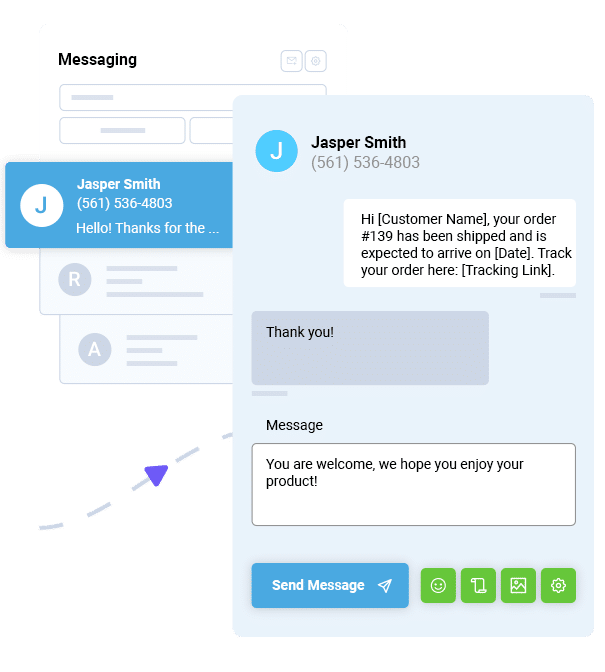
Hi {FirstName}, good news: your order #{OrderNumber} has shipped via {Carrier}. Track it here: {TrackingLink}. Reply HELP for support.
When to send: As soon as the label is created and the parcel is handed off (or scanned) by the carrier.
2) Out for Delivery
{Brand}: Your package for order #{OrderNumber} is out for delivery today. If you can, keep an eye out. Tracking: {TrackingLink}.
When to send: The morning the carrier marks it out for delivery.
3) Delivery Attempted/Failed
{Brand}: Delivery was attempted for order #{OrderNumber}, but it couldn’t be completed. Next steps (pickup/redelivery): {TrackingLink}. Need help? {SupportLink}
When to send: Immediately after a failed attempt scan.
4) Delivered Successfully
{Brand}: Delivered! Order #{OrderNumber} was marked delivered today. If you don’t see it, check nearby areas/with neighbors first, then contact us: {SupportLink}.
When to send: Right after a “delivered” scan (or within an hour).
5) Delayed Shipment
{Brand}: Quick update; your order #{OrderNumber} is delayed due to shipping conditions. New estimated arrival: {NewETA}. Track updates here: {TrackingLink}.
When to send: The moment you know the estimated delivery date has shifted.
{Brand}: Your order #{OrderNumber} is ready for pickup at {PickupLocation}. Hours: {Hours}. Bring ID if required. Details: {TrackingLink}.
When to send: When a package is available at a pickup point, locker, or store.
7) Signature Required
{Brand}: Heads up, order #{OrderNumber} requires a signature. Expected delivery: {ETAWindow}. If you won’t be home, manage delivery here: {TrackingLink}.
When to send: When the carrier flags signature required (or the day before delivery).
8) Delivery Rescheduled
{Brand}: Your delivery for order #{OrderNumber} has been rescheduled to {NewDate}. Updated tracking: {TrackingLink}. Questions? {SupportLink}
When to send: As soon as a reschedule is confirmed.
9) Package Held at Facility
{Brand}: Your order #{OrderNumber} is being held at the {Carrier} facility. You may be able to pick it up or request redelivery here: {TrackingLink}.
When to send: When the carrier marks it “held,” “on hold,” or “available for pickup.”
10) Return to Sender
{Brand}: Your package for order #{OrderNumber} is being returned to sender (reason: {ReasonIfKnown}). Please confirm your address so we can resend/refund: {SupportLink}.
When to send: Immediately when the return flow starts.
Templates are great, but they’re just a start. You need to make sure that your texts are sent at the right time and include the right information. We’ve outlined some of the most important things for you to do (and to not do).
Send at Key Delivery Milestones (Not Every Scan)
You don’t need to text customers every time a barcode gets glanced at in a sorting center. Pick the moments that answer real human questions:
Shipped (with tracking)
Out for delivery
Delivered
Exceptions (delay, failed attempt, hold, return)
Sending more often can feel like you’re spamming your customer, even if it’s “informational.”
Include Tracking Number and Carrier
A shipping notification SMS without tracking is like a one-way street sign without arrows. Include the carrier and a tracking link so the customer can self-serve. Otherwise, they’re going to call or email you for more information.
Set Realistic Delivery Windows
Avoid false precision in any order delivery text. “Arrives between 2:10 and 2:40 pm” is a promise you can’t control, and most customers get frustrated when the package isn’t delivered within that window. “Expected Tue/Wed” is better.
Provide Action Steps When Needed
Exception statuses should always answer the question: “What do I do now?”
If delivery failed, include a redelivery link. If a signature is required, tell them how to manage their delivery. If it’s held at a facility, explain their pickup options.
Link to Real-Time Tracking
Most carriers update tracking faster than your business does. Giving your customers a tracking link lets them see where their item is.
Be Proactive About Delivery Complications
A delivered scan doesn’t always mean “in hand.” Add a line about checking side doors and with neighbors before they call or email you.
Be Concise
Brevity is your friend with text messages. Limit your texts to:
Who it’s from ({Brand})
What changed (shipped/out for delivery/delayed)
What to do next (track/manage pickup/contact support)
Know What the TCPA Says about Texting
The TCPA governs automated texts, especially for marketing. Know how it works and what that means for your business. Even if your delivery texts are transactional, consent and opting out should put an immediate stop to messaging that customer. Always make sure you’re messaging them with consent, identifying yourself as the sender, and making opt-out instructions clear (like “Reply STOP to opt out”).
Send Delivery Updates with DialMyCalls
Once you’ve got the right delivery update text templates, the next question is, how do you send them without your team copying and pasting texts all day? The answer is DialMyCalls.
DialMyCalls is built for sending bulk SMS notifications fast, whether you’re messaging hundreds of customers at once, segmenting by delivery status, or triggering texts from your existing systems. DialMyCalls offers mass texting plus options like variable messaging. Here’s how that works :
Your shipping platform updates an order to “out for delivery”.
That event triggers a workflow (via an integration or your own API connection)
DialMyCalls sends the right delivery status text automatically.
Ready to dramatically reduce the number of times your customers ask “where’s my order”? Get in touch to learn more about our capabilities.
Delivery Update Text Message Templates FAQs
How many delivery update texts should I send per order?
Three to five update texts are usually good. That should include when the item is shipped, when it’s out for delivery, after it’s delivered, and things like delays or failed delivery attempts.
When should I send the first delivery update text?
Send it as soon as the order ships (or as soon as tracking is live) so that your customer knows it’s on its way.
What information should I include in delivery update texts?
At a minimum, you should include:
Your brand name
Order number (or a short reference)
Carrier + tracking link
ETA window when available
Action steps for exceptions
A support path (link or “Reply HELP”)
Opt-out options (“Reply STOP to opt out”)
Should I send delivery updates on weekends?
If carriers deliver on weekends in your regions, yes, because customers still want to know what’s happening on a Saturday. Just avoid late-night messages unless the update is urgent.
Can I automate delivery update texts with carriers?
You can automate based on carrier/shipping events by using your shipping platform’s tracking updates (often available via webhooks, apps, or integrations) and then triggering messages through your texting platform’s integration options or API. DialMyCalls supports integration approaches that make this kind of trigger-based messaging possible.
How do I handle delivery delays in delivery update text templates?
Give your customers the information they need:
Name the delay
Give an updated ETA (or best available window)
Give the tracking link
If necessary, tell them how to get support
Also, remember that if you can’t ship within promised timeframes, U.S. FTC guidance expects you to communicate delays and, in some cases, provide options.
Maximize Outreach, Save Time
Start Transforming Your Communication with Mass Texting
Tim Smith is the Media Manager at DialMyCalls, where he has leveraged his expertise in telecommunications, SaaS, SEO optimization, technical writing, and mass communication systems since 2011. Tim is a seasoned professional with over 12 years at DialMyCalls and 15+ years of online writing experience.
“I am a youth minister and have spent hours in the past calling students individually to remind them of an upcoming event or to get out an urgent announcement. With DialMyCalls.com, I cut that time down to about 1 minute. I also love how I can see exactly who answered live and how long they listened so I know if they heard the whole message. DialMyCalls.com is the best website I have stumbled upon all year! Thanks!”
Real Results, Real ReviewsOver 40,000 customers trust our platform – and it shows.
4.3
502 Reviews
4.7
836 Reviews
Author
Tim SmithMedia Manager
Tim Smith is the Media Manager at DialMyCalls, where he has leveraged his expertise in telecommunications, SaaS, SEO optimization, technical writing, and mass communication systems since 2011. Tim is a seasoned professional with over 12 years at DialMyCalls and 15+ years of online writing experience.
“I am a youth minister and have spent hours in the past calling students individually to remind them of an upcoming event or to get out an urgent announcement. With DialMyCalls.com, I cut that time down to about 1 minute. I also love how I can see exactly who answered live and how long they listened so I know if they heard the whole message. DialMyCalls.com is the best website I have stumbled upon all year! Thanks!”
Fill out the form below to get a fast custom pricing quote specific for your
organization.Want to speak to our sales team now? Call us at
1-800-928-2086
Thank you!
A representative will be reaching out to you soon.
For immediate help you can call us on
800-928-2086.
Try Out DialMyCalls Now?
Enter a new password and click create account and you'll be able to send 25 test messages now.
Send A Sample Broadcast
We'll send a sample call or text to your phone right now. Remember when you use DialMyCalls you can record your message in your own voice. When the phone rings just pick up and say "Hello" to hear the message.