When a crisis strikes, you don’t have time to wonder who should handle communications or how you’ll reach everyone who needs to hear from you. That’s why a crisis communication playbook is so important. It gives you a structured, ready-to-use plan that keeps your organization coordinated. In this guide, you’ll learn how to identify your biggest threats, map out your crisis communication team, build templates and workflows that eliminate guesswork, choose the right communication channels, train your staff, and keep your playbook updated and accessible. You’ll also see how automated tools like DialMyCalls make it easier to deliver fast, consistent alerts when it counts.
You Can Count on Crises to Be Unpredictable
Emergencies never happen on your schedule. They arrive suddenly and force you to make urgent decisions under pressure. That’s why having a well-designed crisis communication playbook isn’t optional. This document becomes your lifeline during emergencies, giving you clear steps, approved language, defined roles, and specific communication methods, so you can get the word out fast.
And make no mistake, every organization needs a crisis communication playbook, from schools to corporations, nonprofits, municipalities, healthcare facilities, hospitality groups, and community organizations. Whether you’re dealing with a weather emergency, a cybersecurity incident, a workplace injury, or something entirely different, you need a plan that helps you protect people.
Within just a couple of days, up to 20 inches of rain fell.
Up to 12 inches of rain fell in only 6 hours in some locations (the highest in 70 years of tracking).
The Guadalupe River at Kerrville rose 32.5 feet in just 1.5 hours.
Over 135 people lost their lives in the area, including teens at several youth camps, rescue workers, municipal workers, area residents, and others.
This brief event caused damages in excess of $18 billion.
In this step-by-step guide, you’ll learn exactly how to build a crisis communication playbook that works in real life. You’ll walk through how to assess risks, structure your communication team, write message templates, define workflows, choose the right communication channels, test your strategy, and keep everything up to date. You’ll also see how tools like DialMyCalls’ Emergency Notification System help you send alerts when you need them most.
What Is a Crisis Communication Playbook?
A crisis communication playbook is a predefined plan that outlines how your organization communicates during an emergency. Basically, it tells you who will be handling everything, what they’ll be communicating, when they’ll be communicating, and to whom they’ll be sending messages.
Your playbook includes:
The crises you’re most likely to face
Clear team roles and responsibilities
Message templates and talking points
Your communication channels and notification systems
Approval workflows and escalation rules
Training and testing procedures
You build it in advance so you’re not scrambling when the time comes. During a crisis, you turn to the playbook, follow the steps, and execute your plan.
Why It’s So Important
When a crisis hits, there’s no time for second-guessing. A playbook helps you avoid miscommunication, misinformation, or contradictory messaging.
Common Crisis Types Your Playbook Should Cover
Natural disasters (storms, floods, wildfires)
Cyberattacks and data breaches
Workplace violence or security threats
PR issues or reputational harm
Medical emergencies
Utility failures or system outages
Environmental hazards
Accidents and injuries
Every industry has its own unique risks, but the need for a structured response is universal.
Step 1: Identify Potential Crisis Scenarios
Before you can write a communication plan, you need to know what you’re planning for. That starts with a thorough risk assessment.
Conduct a Risk Assessment
Look at both internal and external threats. Internal risks might include things like equipment failures, power outages, staff shortages, or technology problems. External risks could include severe weather, cybersecurity threats, supply chain disruptions, or community safety issues.
Ask yourself:
What’s happened before within my organization?
What risks is our geographic area prone to?
What’s happening to similar organizations?
What vulnerabilities do you have today?
Categorize Crisis Types
Break crises into categories to help you organize your messaging and response plans:
Operational: outages, system failures, and supply chain issues
Reputational: public complaints, viral incidents, and negative press
Security: physical threats, break-ins, and workplace violence
Safety: environmental hazards, injuries, and medical emergencies
Create a Risk Matrix
A risk matrix helps you rank events based on the likelihood that they’ll happen and the impact they’ll have. Focus first on high-probability, high-impact scenarios, but don’t automatically discount less probable emergencies.
Tip: Get your people involved, like department heads, technical leads, and frontline staff. They often see risks that leadership misses.
Instant Communication, Whenever You Need It
Send Real-Time SMS & Voice Call Alerts from Anywhere
A crisis plan isn’t effective unless everyone knows exactly what they’re responsible for. Your crisis communication team should include clearly defined roles and a chain of command.
Key Roles and Responsibilities
Crisis Leader
This person has final decision-making authority. They approve messaging, direct the team, and coordinate with leadership.
Spokesperson
Your spokesperson is the official voice of the organization and should be someone trained to handle public inquiries and press statements.
Internal Communications Lead
This person manages staff alerts, updates, safety instructions, and internal questions.
Legal & Compliance Advisor
They review messaging for accuracy, liability risks, and rules and regulatory requirements.
Establish a Contact Hierarchy
Your playbook should clearly document the following:
Who is contacted first
Who steps in if someone is unavailable
How quickly each person has to respond
Each person’s preferred contact method
Step 3: Develop Key Messaging Frameworks
You don’t have time to write entire messages from scratch when an emergency hits. Pre-approved templates help with consistency, improve your accuracy, and save valuable time.
Email is good for detailed updates, follow-up instructions, or post-crisis communication.
Website or Intranet Alerts
Website and intranet alerts are great for posting public updates, FAQs, or longer statements that can be referenced repeatedly.
Social Media
Social media platforms are useful for real-time public engagement and reaching a wide audience. However, because of the way these platforms’ algorithms work, you can’t count on them for fast notifications or even guarantee that every follower will see your alerts.
Weather Alert Integrations
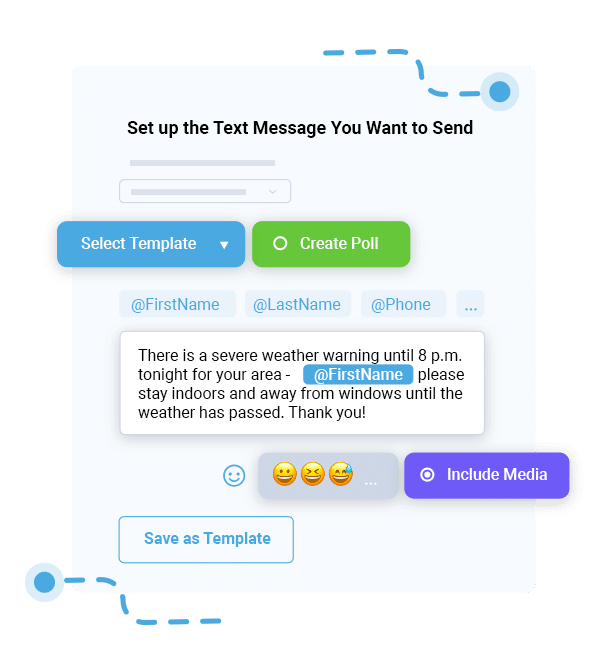
If you’re in a region prone to storms, wildfires, floods, or tornadoes, integrate automated updates from tools like DialMyCalls Weather Alerts.
Why Automated Notification Systems Matter
During a crisis, manual communication is slow and error-prone. Automated systems help you:
Deliver accurate updates instantly
Reach multiple channels at once
Ensure everyone gets the same message
Track who received and opened alerts
Eliminate outdated or incomplete contact lists
Systems like DialMyCalls are designed specifically for real-time alerts, making them a powerful addition to your playbook.
Step 5: Create an Escalation and Approval Workflow
A communication plan isn’t complete without a clear workflow to tell you who does what, when, how, and in what order. It guarantees accountability, improves accuracy, reduces confusion, and speeds up decision-making.
Document Who Approves What
Your playbook should state explicitly:
Who writes messages
Who reviews them
Who has final approval
Who pushes them out across each channel
Build a Visual Workflow
A flowchart or diagram helps your team understand:
When messages are triggered
What criteria are required
Who needs to sign off
How information moves from one step to the next
Set Time-Based Escalation Rules
Crises evolve quickly. If someone doesn’t approve a message within a set timeframe, the playbook should automatically elevate the issue.
For example:
If no approval within 10 minutes, escalate to the Crisis Leader.
If no response from the Crisis Leader within 5 minutes, escalate to the next person in the chain.
The goal is to prevent bottlenecks that delay communications that could potentially save lives.
Step 6: Test and Train Regularly
A crisis communication plan only works if your team knows how to use it. That’s why testing and training are such important parts of your preparedness planning.
Schedule Quarterly Drills
Run simulations for scenarios like:
Severe weather approaching
Active security threats
Major IT outage
Health emergencies
Utility failures
These drills help you spot the strengths and weaknesses in your plan.
Review Key Metrics
After each test, review:
How quickly messages were drafted
How fast they were approved and sent
Delivery success rates
Engagement or response rates
Staff understanding and reaction
Refine the Playbook Based on What You Learn
Every drill teaches you something new. Use those insights to update processes, improve templates, refine roles, or strengthen your workflows.
Tip: Use scenario-based training to help your staff practice real-life decision-making under pressure.
Step 7: Review, Update, and Distribute the Playbook
A crisis plan isn’t static. It’s a living document that needs to evolve with your organization, technology, staffing, and the risks you face.
Keep Multiple Versions Accessible
Store:
A digital version on your intranet or shared drive
A printed version in key offices
A mobile-accessible version for remote staff
Review Every 6 to 12 Months
Update the playbook whenever:
Roles change
New communication tools are introduced
Regulations shift
New threats emerge
You complete a major drill
Make Sure Everyone Knows Their Role
Communicate any changes and review responsibilities regularly (staff meetings, training sessions, or annual safety briefings, for instance).
The Ability to Act When It Counts
When you build a crisis communication playbook, you give your organization something invaluable: the ability to act when it counts. You’ll protect people, reduce confusion and chaos, and improve coordination and accuracy.
Every minute counts in a crisis, and your ability to communicate clearly can completely change the outcome. That’s why now is the perfect time to create or update your own playbook.
If you’re ready to simplify the process of sending fast, reliable alerts, explore how DialMyCalls helps organizations deliver real-time emergency notifications when they matter most.
Crisis Communication FAQs
What is a crisis communication playbook?
It’s a predefined, step-by-step plan that outlines how your organization communicates during an emergency. It includes templates, roles, workflows, communication channels, and escalation procedures.
Why is a crisis communication playbook important?
It makes sure that you can communicate quickly, clearly, and consistently when a crisis happens. This helps you reduce confusion and protect people.
What types of crises should organizations prepare for?
You should prepare for natural disasters, cyberattacks, data breaches, utility failures, safety threats, reputational issues, accidents, and emergencies specific to your industry.
What communication channels should be included in a crisis plan?
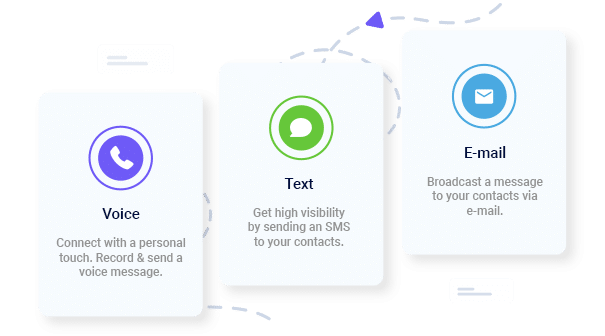
Use SMS, voice broadcasts, email, websites, intranets, social media, and weather alert integrations. Systems like DialMyCalls help you deliver alerts instantly across multiple channels.
How can technology help in crisis communication?
Technology automates message delivery, reduces human error, helps make sure there’s consistency, tracks message engagement, and lets you reach large audiences quickly through tools like emergency texting and weather alerts.
Keep Everyone Connected & Informed
Get the Word Out Quickly with Bulk Texting and Voice Calls
Ryan Betancur is an Emergency Management Planner at Hagerty Consulting and a proud US Army veteran. Drawing on years of experience, he specializes in healthcare and critical infrastructure emergency management, strategic planning, and business continuity. Ryan has been on the front lines managing COVID-19 responses in New Jersey and Illinois and supporting NYC's Migrant Crisis response. He holds a master's degree in Homeland Security and Emergency Management and multiple certifications in emergency preparedness.
“I am a youth minister and have spent hours in the past calling students individually to remind them of an upcoming event or to get out an urgent announcement. With DialMyCalls.com, I cut that time down to about 1 minute. I also love how I can see exactly who answered live and how long they listened so I know if they heard the whole message. DialMyCalls.com is the best website I have stumbled upon all year! Thanks!”
Real Results, Real ReviewsOver 40,000 customers trust our platform – and it shows.
4.3
502 Reviews
4.7
836 Reviews
Author
Ryan BetancurEmergency Management Planner
Ryan Betancur is an Emergency Management Planner at Hagerty Consulting and a proud US Army veteran. Drawing on years of experience, he specializes in healthcare and critical infrastructure emergency management, strategic planning, and business continuity. Ryan has been on the front lines managing COVID-19 responses in New Jersey and Illinois and supporting NYC's Migrant Crisis response. He holds a master's degree in Homeland Security and Emergency Management and multiple certifications in emergency preparedness.
“I am a youth minister and have spent hours in the past calling students individually to remind them of an upcoming event or to get out an urgent announcement. With DialMyCalls.com, I cut that time down to about 1 minute. I also love how I can see exactly who answered live and how long they listened so I know if they heard the whole message. DialMyCalls.com is the best website I have stumbled upon all year! Thanks!”
Fill out the form below to get a fast custom pricing quote specific for your
organization.Want to speak to our sales team now? Call us at
1-800-928-2086
Thank you!
A representative will be reaching out to you soon.
For immediate help you can call us on
800-928-2086.
Try Out DialMyCalls Now?
Enter a new password and click create account and you'll be able to send 25 test messages now.
Send A Sample Broadcast
We'll send a sample call or text to your phone right now. Remember when you use DialMyCalls you can record your message in your own voice. When the phone rings just pick up and say "Hello" to hear the message.